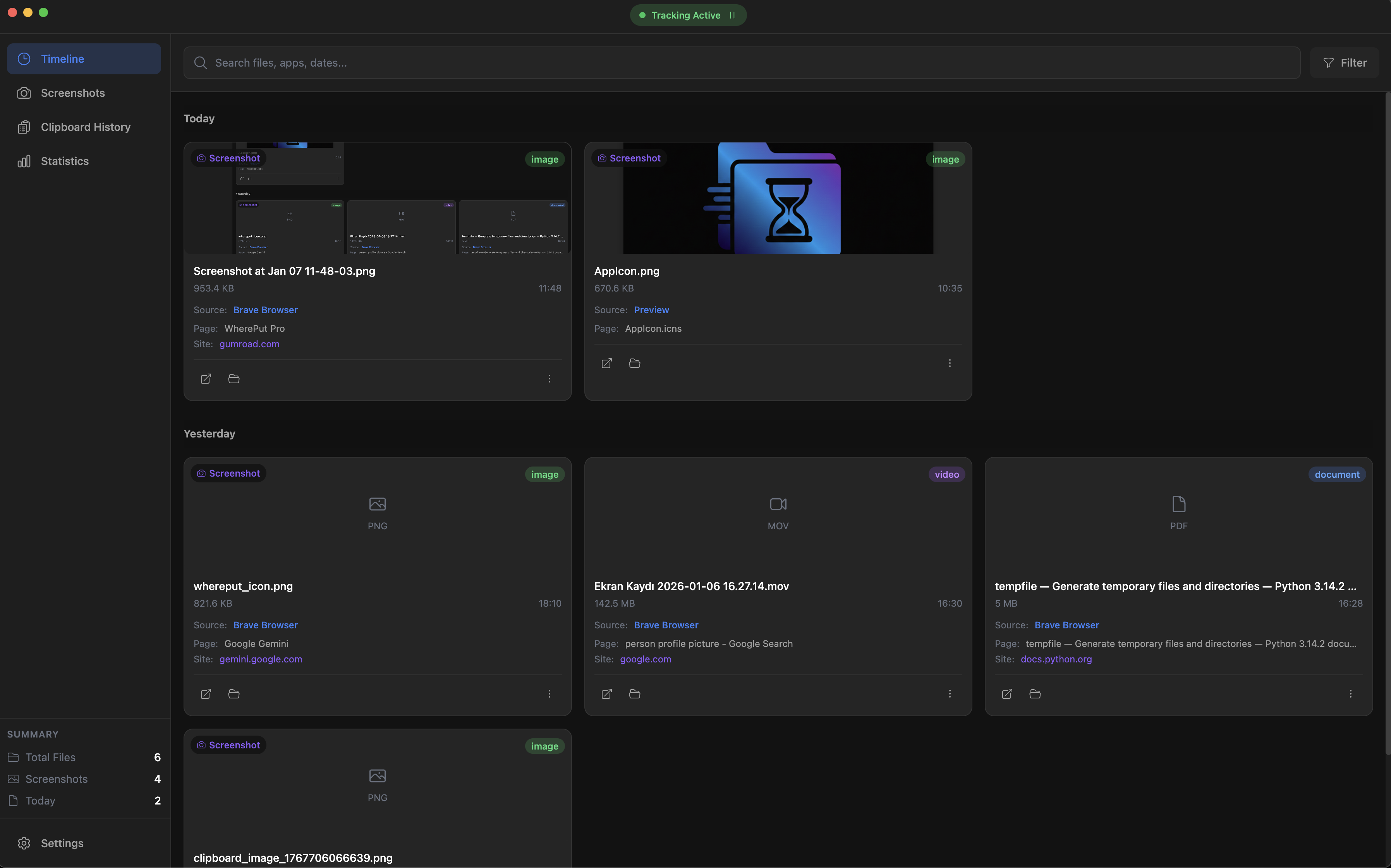
WherePut automatically tracks your downloads, screenshots, and clipboard with what you were doing when you saved them. Find any file by context, not by filename.
"I downloaded a PDF yesterday... but what was it called?"
"I took a screenshot of that design... where did it go?"
"I copied that API key last week... I need it again!"
"I saved it while researching... but which project?"
WherePut captures what you were doing when you saved a file. The app you were using, the website you were on, the time of day. So you can find files the way you actually remember them.
Automatically captures every file you download with full context - which app, which website, what time.
Every screenshot is tagged with what was on your screen. Find screenshots by context, not cryptic timestamps.
Never lose copied text again. Full clipboard history with context - know exactly where you copied from.
Search by filename, app name, date, or any context keyword. Find what you need in seconds.
All data stays on your device. No cloud, no sync, no tracking. Your files, your business.
Runs quietly in your system tray. Always there when you need it, invisible when you don't.
Download WherePut and let it run in your system tray. Grant accessibility permissions when prompted.
WherePut quietly watches your Downloads and Desktop folders, tracking context for every new file.
When you need a file, search by what you were doing. "Slack design" or "Chrome invoice" - you'll find it.
Start with a free trial, upgrade when you're ready.
30-day money-back guarantee
"I used to spend 10 minutes looking for downloads. Now it takes 10 seconds. WherePut is a game changer."
"The clipboard history alone is worth the price. But the context tracking? That's magic."
"Finally an app that thinks the way I think. 'That PDF I downloaded while on Zoom' - found instantly."
No. WherePut is 100% local. All your data stays on your device. We don't have servers, we don't collect data, and we don't track you. Your privacy is guaranteed.
On macOS, WherePut needs Accessibility permissions to detect which app is active. On Windows, no special permissions are required. We only access the folders you specify (Downloads and Desktop by default).
No. WherePut is extremely lightweight. It uses minimal CPU and RAM, running quietly in the background. You won't notice it's there until you need it.
After 7 days, the free tier limits apply (20 files, 50 clipboard items, 7-day history). Your data is preserved - you can upgrade anytime to unlock everything.
Currently we only offer lifetime licenses. Pay once, use forever, including all future updates. We believe in simple, fair pricing.
Yes! One license covers up to 3 devices for personal use. Just enter the same license key on each computer.
We offer a 30-day money-back guarantee, no questions asked. If WherePut isn't for you, just email us for a full refund.
Download WherePut and try it free for 7 days. Your future self will thank you.
Download Free Trial